
Opened 17 years ago
Closed 17 years ago
#931 closed Bug (fixed)
FCKConfig.BodyClass not assigned to the preview window
| Reported by: | kpobococ | Owned by: | Alfonso Martínez de Lizarrondo |
|---|---|---|---|
| Priority: | Normal | Milestone: | |
| Component: | General | Version: | FCKeditor 2.4.3 |
| Keywords: | Cc: |
Description
The FCKConfig.BodyClass is not assigned to the preview window body element, so the custom style is broken in the preview window.
Steps to reproduce
- Use the custom style file via the
FCKConfig.EditorAreaCSSconfig option. Make sure you have thecustomclassbackground-color set to something different from thebodybackground-color. - Set the
FCKConfig.BodyClasstocustomclass - Press the preview button and see, that the preview background-color is different from the one in the editor window
Browser name and OS User Agent Mozilla/5.0 (Windows; U; Windows NT 5.1; ru; rv:1.8.1.4) Gecko/20070515 Firefox/2.0.0.4
Browser Firefox/2.0.0.4
Platform Windows XP sp1
Attachments (1)
Change History (3)
Changed 17 years ago by
| Attachment: | fck_bug_001.jpg added |
|---|
comment:1 Changed 17 years ago by
| Component: | UI : Context Menu → General |
|---|---|
| Owner: | set to Alfonso Martínez de Lizarrondo |
Note: See
TracTickets for help on using
tickets.


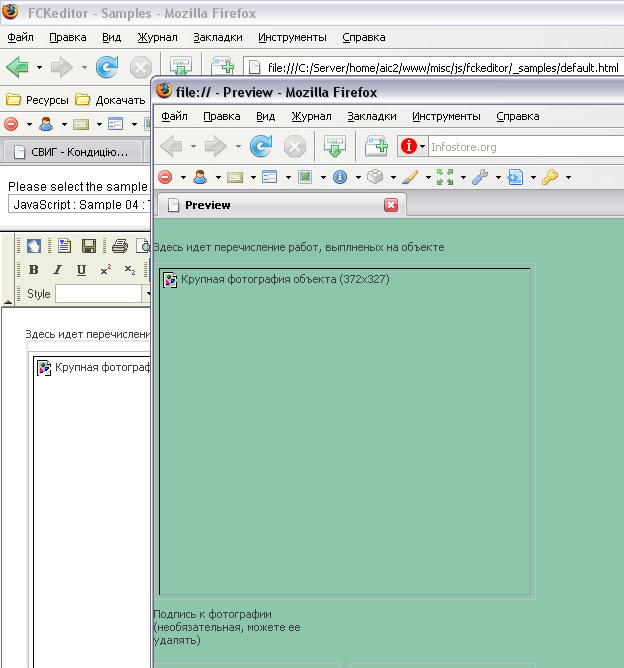
The screenshot displays the white background in the editor and the green background in the preview window